Try Agent Skills in VS Code
Recently, a new trend has emerged in utilizing agent skills, as seen at: https://agentskills.io/home. It appears to be quite straightforward to assign specific tasks to an agent, provided that your requirements are clearly outlined in the skill.md file.
I decided to give it a try. As an avid book lover, I occasionally come across potentially interesting new books. Typically, I research the ratings on well-known sites like Douban and Amazon to gauge overall reader feedback and the total number of ratings. I then apply a personal formula to determine a final rating, helping me filter out lower-rated books that don’t meet my standards.
When my wife suggested using an agent to automate this process, I thought it was a great idea. So, I spent about half an hour with Agent Skills to set up a basic version.
First, I need to enable agent skills in VS Code To use skills, you must be on VS Code Insiders and enable the feature:
- Open VS Code Insiders
- Go to Settings → Search: chat.useAgentSkills
- Turn it ON
Using the VS Code agent, I asked GitHub Copilot to generate Python files, such as book_rating_fetcher.py, to fetch the rating data. I was amazed at how well it understood my requirements—within 10 minutes, the code was ready. Here’s what I achieved:
 1PS D:\Repo_try\skills\.skills\fetch-doubanbook\scripts> python .\book_rating_fetcher.py "黑猫警长"
 2Searching for: 黑猫警长
 3--------------------------------------------------
 4✓ Book: 黑猫警长.三
 5✓ Author: 戴铁郎
 6✓ Rating: 8.9/10
 7✓ Number of Raters: 683
 8
 9  Rating Distribution:
10    ★★★★★ 60.3%
11    ★★★★☆ 30.7%
12    ★★★☆☆ 8.6%
13    ★★☆☆☆ 0.1%
14    ★☆☆☆☆ 0.1%
15
16  Book URL: https://book.douban.com/subject/2253235/
I then create a .skills folder, with a subfolder named fetch-doubanbook. The overall folder structure looks like this: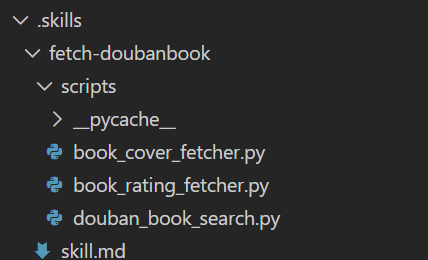
The skill.md looks like the following:
 1# Skill: fetch-doubanbook
 2
 3## Purpose
 4Fetch the book data from douban web site.
 5
 6## When to use
 7Copilot should load this skill automatically whenever the user asks:
 8- "douban book"
 9- "book"
10
11## Workflow
121. The user give the book name like douban book: "三体"
132. Run the python script in /scripts/book_rating_fetcher.py + the book name.
142. Capture the output.
154. Show the output
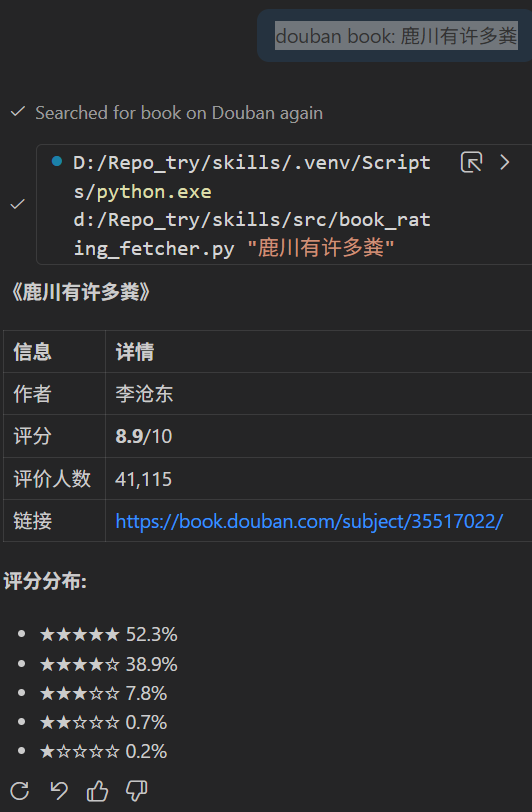
Next, in the VSCode chat window, I type something like "douban book: 鹿川有许多粪". The skill is automatically discovered, loaded, and the relevant Python script is executed. I also receive a helpful response similar to the following:
Yes, this is a very basic version of using agent skills, but it clearly shows how easy it is to configure skills and workflows using natural language. I'll continue experimenting to learn more.
Written by Binwei@Suzhou