Mac Tips
Published: Jul 31, 2020 Tags: efficiency Category: Engineering
I got first Macbook 3 years ago, but only use Macbook as production environment 9 months ago. In order to use Macbook in an efficient way, some tips can be important to know.
Short cut keys
Capture window
| Command + Shift + 5 | Record video for screen |
|---|---|
| Command + Shift + 4 | Capture screen to file |
| Command + Shift + 4 + space | Capture current screen |
| Command + Control + Shift + 4 | Capture screen to clip-board |
Finder
| Command + Shift + G | Jump to any folder |
|---|---|
| Command + up/down | Jump to parent or sub folder |
| Command + shift + . | Show hidden files |
Safari
| Command + + | Zoom in |
|---|---|
| Command + - | Zoom out |
Operating System
| Fn + Delete | Delete the character after |
|---|---|
| Command + tab | Switch between applications |
| Command + ~ | Switch between windows in app |
| Command + h | Hide current window |
| Command + m | Minimize current window |
| Command + Option + ^ | Sleep |
| Control + Shift + ^ | Turn off screen |
| Command + W | Close current window |
| Command + Q | Close current application |
| Command + Shift + Y | Generate note from selected text |
| Ctrl + Left or right | Switch screen |
| Command + Option + D | Show/Hide docker |
Useful tips
Switch OS in BootCamp
During start-up, press option key
Space
几乎所有文件都可以用空格键来预览,而且可以用上下键切换
Touchbar
可以定制,Fn press 会在Touch Bar显示Fx功能键
Spotlight
Highlight a file and Command to see the path, or Command + R jump to the folder
Track pad
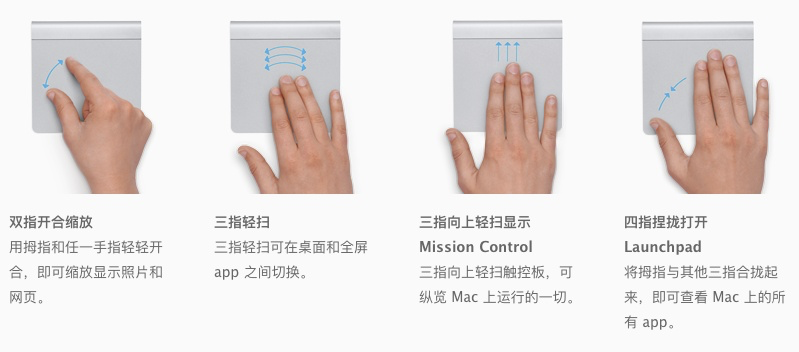
三指往上推,Mission Control
Mirror/split screen
- Use QuickTime player can mirror iphone screen to Macbook
- 长按最大化按钮可以做到分屏
- Sidecar和iPad分屏操作
提取pdf部分页面
可以用Preview -> 缩图清单,选取提取页面,拖拽到桌面即可
删除文件夹
rm -rf xxx
Written by Binwei@Singapore